Republic Day Banner and Poster Design in Hindi and Marathi (26 January)
 IndiaFont Team24 November 20265 min read

On 26 January 2027 India celebrates its 78th Republic Day. Schools need a stage banner, housing societies print a flag hoisting notice, shops send a greeting, and everyone posts a wish. This guide gives the wording in Hindi, Marathi and Gujarati, the simple tricolour rules to follow, and how to make each design in IndiaFont V6.
Republic Day wishes: the lines people write
Hindi
गणतंत्र दिवस की हार्दिक शुभकामनाएं!
जय हिंद, जय भारत
Marathi
प्रजासत्ताक दिनाच्या हार्दिक शुभेच्छा!
जय हिंद!
Gujarati
પ્રજાસત્તાક દિનની હાર્દિક શુભેચ્છાઓ!
Short lines that work well in big calligraphy: जय हिंद, वंदे मातरम्, भारत माता की जय, गणतंत्र दिवस, प्रजासत्ताक दिन.
For a shop or business: "[नाम] की ओर से सभी देशवासियों को गणतंत्र दिवस की हार्दिक शुभकामनाएं".
Flag hoisting (ध्वजारोहण) invitation wording
Marathi, for a society or school
ध्वजारोहण समारंभ
७८ व्या प्रजासत्ताक दिनानिमित्त ध्वजारोहण समारंभ आयोजित केला आहे.
दिनांक: २६ जानेवारी २०२७ · वेळ: सकाळी [वेळ]
स्थळ: [ठिकाण]
सर्व सदस्यांनी उपस्थित राहावे, ही विनंती.
Hindi
ध्वजारोहण कार्यक्रम
78वें गणतंत्र दिवस के अवसर पर ध्वजारोहण कार्यक्रम का आयोजन किया गया है।
दिनांक: 26 जनवरी 2027 · समय: प्रातः [समय]
स्थान: [स्थान]
आप सभी सादर आमंत्रित हैं।
Tricolour rules to follow in your design
Republic Day designs use the tricolour, so keep these simple rules from the Flag Code of India in mind:
- Saffron on top. When you show the flag, the saffron band is always at the top and the Ashoka Chakra stays in the centre of the white band.
- No text on the flag. Put your words above, below or beside the flag, never written across it.
- Do not distort it. Avoid stretching, cutting or recolouring the flag itself. Tricolour brush strokes, ribbons and balloons are a safe way to bring in the colours.
- The State Emblem is protected. The Lion Capital emblem has its own law (the State Emblem of India (Prohibition of Improper Use) Act, 2005), so leave it out of private greetings and shop designs.
These tricolour pictures are in the IndiaFont V6 art library:


Pick the right size
| What you make | Size in IndiaFont V6 |
|---|---|
| WhatsApp wish or status | WhatsApp Status, 1080 × 1920 px |
| Instagram or Facebook post | Instagram Post, 1080 × 1080 px |
| Notice board or flag hoisting notice | A4 (210 × 297 mm) |
| School stage or society banner | Banner, 72 × 36 in, or any custom size |
| Big poster | Poster, 420 × 594 mm |
How to make a Republic Day banner in IndiaFont V6
Step 1: Start from a template or a size
Open the Republic Day template from the templates, or pick a size from the table and start blank.

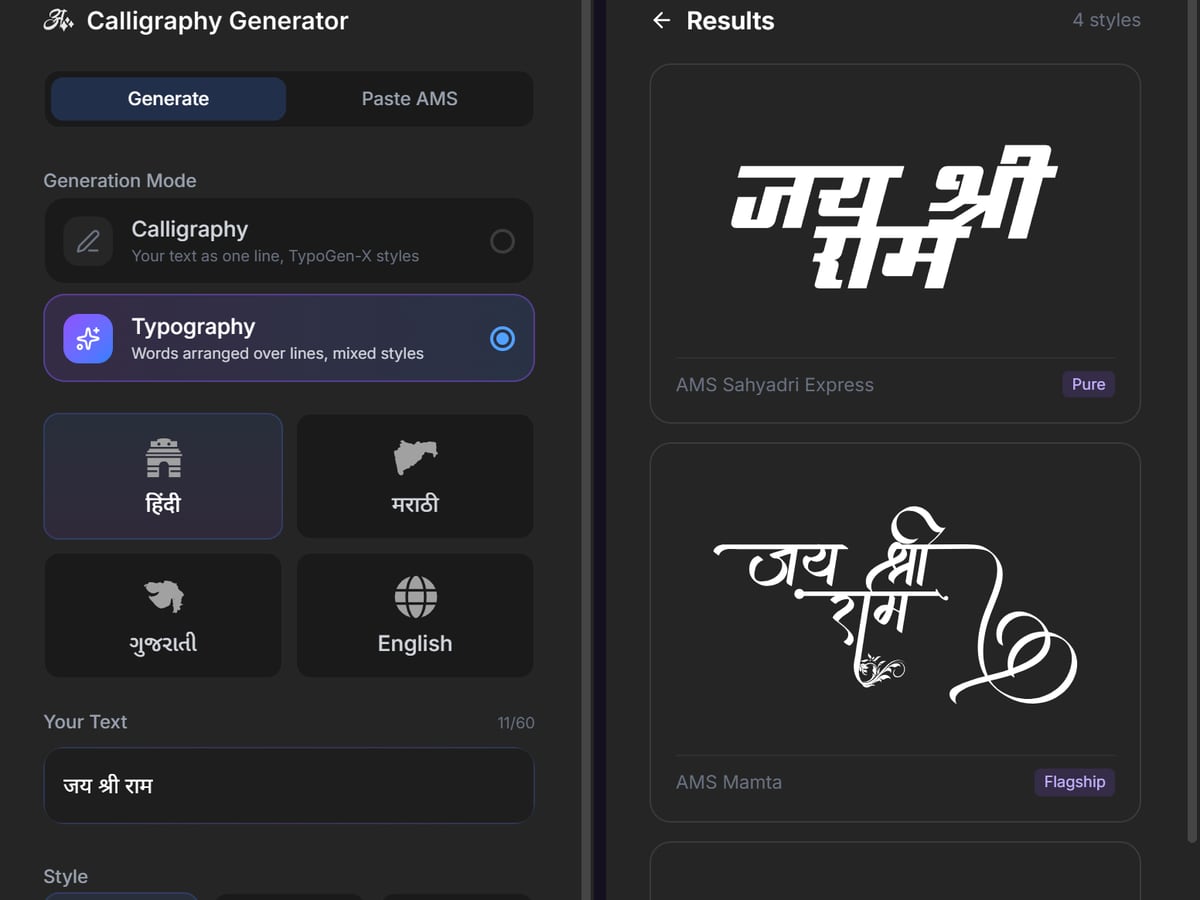
Step 2: Write the main line in calligraphy
Open Calligraphy AI and type गणतंत्र दिवस की हार्दिक शुभकामनाएं or प्रजासत्ताक दिनाच्या हार्दिक शुभेच्छा. You can type in English letters and pick the suggested word. Choose a style; it lands in your design as editable vector art. Give it a saffron-to-green gradient, or keep it dark on a light tricolour background so it reads from far away.
Step 3: Add the tricolour and the details
Add a tricolour brush stroke, ribbon or balloons from the library. Put the school, society or shop name, date and time in a clear font. For a banner, keep the text big and few: one main line, one line of details.
Step 4: Export for print or phone
For the flex printer export PDF, EPS or TIFF at 300 DPI. PDF, SVG and EPS turn the text into paths, so the press does not need your fonts. For WhatsApp export JPG or PNG.
FAQ
Frequently Asked Questions
Q:
What do people write on a Republic Day banner?
In Hindi, गणतंत्र दिवस की हार्दिक शुभकामनाएं; in Marathi, प्रजासत्ताक दिनाच्या हार्दिक शुभेच्छा; in Gujarati, પ્રજાસત્તાક દિનની હાર્દિક શુભેચ્છાઓ. Short lines like जय हिंद and वंदे मातरम् work well in big calligraphy.
Q:
Which Republic Day is it in 2027?
26 January 2027 is India's 78th Republic Day. The Constitution came into force on 26 January 1950.
Q:
Can I write text on the Indian flag in my design?
No. The Flag Code of India says no lettering should be put on the flag. Place your text above, below or beside it, and keep the saffron band on top.
Q:
What size should a Republic Day banner be?
IndiaFont V6 has a Banner size of 72 × 36 inches and you can set any custom size in px, mm, cm or inches. Ask your flex printer for the size and file type, and design at that size.
Q:
Is there a Republic Day template in IndiaFont?
Yes. IndiaFont V6 has a Republic Day template with the tiranga, and tricolour pictures in the art library. Open the template, change the words and export.
Related

Download IndiaFont V6 Free
IndiaFont + a full design tool in one app, and it also works inside CorelDRAW and Adobe. 342 AMS calligraphy fonts for Hindi, Marathi, Gujarati & English, Calligraphy AI, templates and text art.
- Free plan: ₹0, no card, no time limit
- 342 AMS fonts, Calligraphy AI, templates & text art
- Plugins for CorelDRAW, Illustrator, Photoshop & more
4 lakh+ downloads since 2017

