What's New in IndiaFont V6
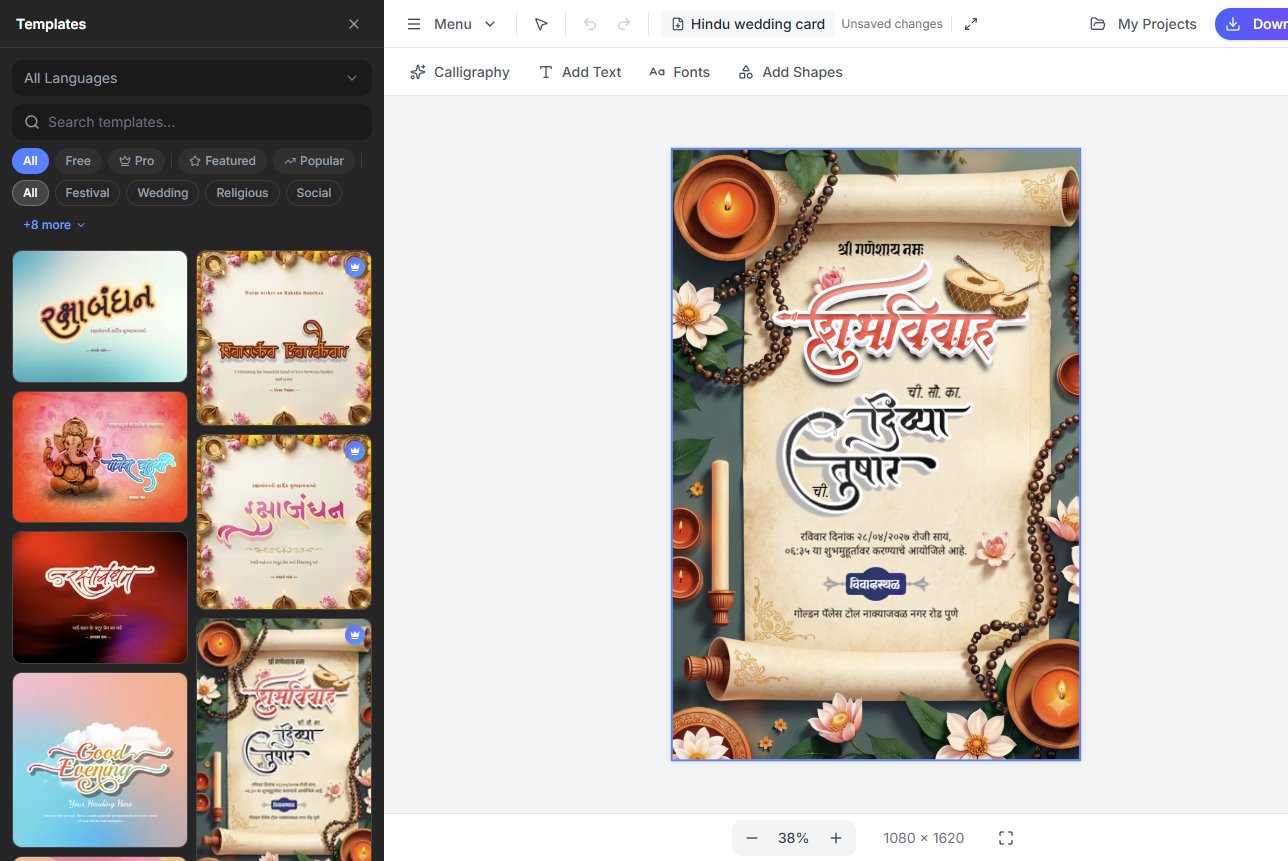
IndiaFont V6 launched on 3 November 2026. In one line: IndiaFont + a full design tool in one app, and it also works inside CorelDRAW and Adobe.
Before and Now
| Before (V4 / V5) | Now (V6) |
|---|---|
| Type in IndiaFont, then design in CorelDRAW or Photoshop | The whole design in V6 |
| Copy-paste between programs | The IndiaFont panel inside CorelDRAW and Adobe |
| Key-map typing for Hindi | Normal Hindi typing |
Your old V4 / V5 .if designs open in V6, and you keep the same account.
1. CorelDRAW and Adobe Plugins
The biggest new feature. Plugins for CorelDRAW 2018+, Illustrator, Photoshop, InDesign, Premiere Pro and After Effects. The IndiaFont panel has five tabs:
- •Generator - type a word, pick a calligraphy result, it lands in your document
- •Fonts - type with AMS fonts in CorelDRAW / Adobe, change any letter shape, update in place
- •Text Art - ready calligraphy, one click to insert
- •Assets - backgrounds, cliparts and frames from the V6 library
- •My Data - the calligraphy and effect pictures you made in V6
Set up: My account › Plugins › Install; the IndiaFont panel is in the program's Window menu; keep V6 running (tray). Premiere Pro and After Effects insert PNG pictures.
2. Calligraphy and Fonts
- •Calligraphy AI - type a word in Hindi, Marathi, Gujarati or English, get AMS-style calligraphy as editable vector art, on one line or several (Free 10 a day, Pro 75)
- •342 AMS fonts, protected on your computer
- •Letter shapes - click a letter, pick another of its drawn shapes (Ctrl+. and Ctrl+,)
- •Quick Calligraphy on any text - one click, offline
- •Type Hindi the normal way - built-in Unicode to AMS converter, typing suggestions from English, offline
- •570+ Google Fonts, 29 colour AMS fonts, and My Fonts (your installed fonts or added TTF/OTF)
- •Line and letter spacing
3. A Full Design Editor
- •Several pages per design (Free 2, Pro 10)
- •Layers: hide, lock, reorder
- •The Edit panel: colour, gradient, stroke, shadow, align, transform, blend
- •Align to page or selection, with snapping
- •Copy style / paste style, reset styling
- •Image clipping: a photo inside a shape or inside calligraphy
- •Text to path, including Hindi and Gujarati conjuncts
- •Weld
- •Your own pictures (JPG, PNG, SVG)
- •CorelDRAW-like shortcuts and 50-step undo (Ctrl+/ lists them)
4. Effects
- •7 engines, 100+ ready effects: Text FX, Creative Effects, Effect Builder, Advanced 3D (true 3D with lighting and materials), True Shadow, Metal FX, Filter library (Free: basic set)
- •Warp - 11 styles, stays editable
- •Image filters - 8 presets plus sliders
- •16 blend modes
5. Ready-made Content
5,300+ ready assets in total:
- •Templates - complete designs: open, change the words, export
- •1,300+ ready calligraphy art pieces in Hindi, Marathi, Gujarati and English, many in gold, 3D and colour
- •2,000+ assets - backgrounds, textures, cliparts, frames, borders, dividers, ornaments, icons
6. Files, Export and Safety
- •Export in 8 formats: JPG, PNG, WebP (2×/3×/4×), TIFF 300 DPI, SVG, PDF (multi-page), EPS, DXF (laser/CNC). Free: JPG with watermark, up to 1920 px, 5 a day
- •Auto saving every 30 seconds
- •Your designs stay on your computer (not on a server)
- •Backup and restore - one ZIP with your designs, My Data and added fonts
- •Opens your V4 / V5 .if designs
7. Account and App
- •Sign in with Google or your IndiaFont email; existing customers keep their account
- •App screens in हिन्दी and मराठी (the editor stays English)
- •Works offline (connect at least once every two weeks)
- •Automatic updates on Windows; on Mac the app shows a download link
- •Windows 10/11 and macOS 13 or newer (Apple chip or Intel) - see system requirements
Plans
- •Free - ₹0, no card, no time limit (what's included)
- •Pro Yearly - ₹1,420 + GST a year
- •Pro Lifetime - ₹12,400 + GST once
- •Old IndiaFont clients (V1 to V5) - a personal loyalty price at indiafont.com/my-offer
Every plan covers 1 computer, with a free second computer when you buy in time. See pricing.
Get IndiaFont V6
- 1.Download IndiaFont V6 for Windows or Mac
- 2.Sign in with Google or your IndiaFont email, or create a free account
- 3.Open a template or start a blank design
Looking for the previous version? See What's New in IndiaFont V5.