How to Type Hindi and Marathi in CorelDRAW with AMS Fonts (No Broken Matras)
 IndiaFont Team24 November 20267 min read

You type शुभ विवाह, apply an AMS calligraphy font in CorelDRAW, and get a row of wrong letters and matras in the wrong place. This is the most common problem DTP operators and banner makers have with Hindi and Marathi in CorelDRAW and Photoshop. Here is why it happens and three ways to get clean text on your page.
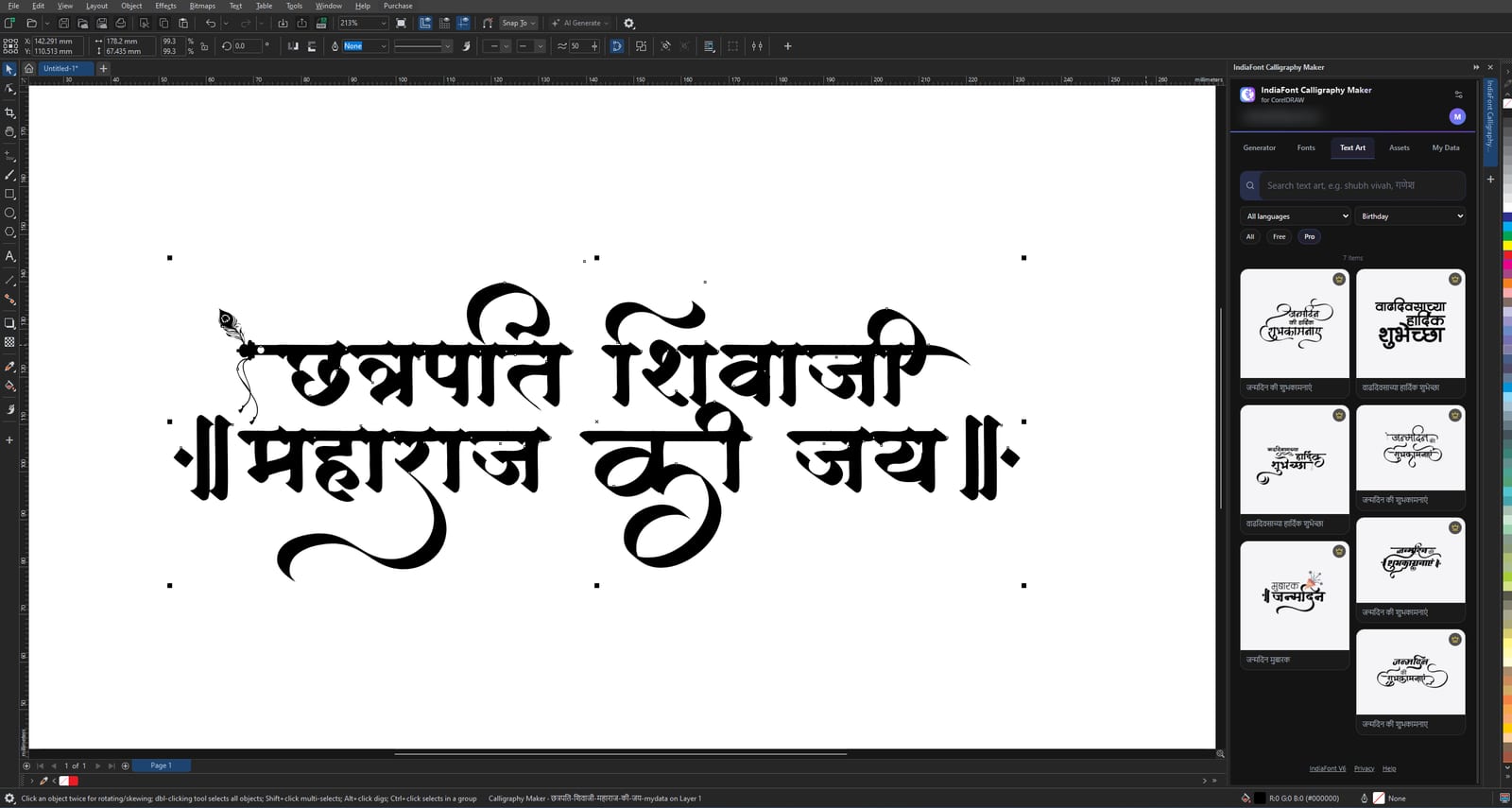
Why Hindi breaks in CorelDRAW
There are two kinds of Hindi and Marathi fonts:
| Unicode fonts | AMS fonts | |
|---|---|---|
| Examples | Fonts that come with Windows, Google Fonts like Mukta or Hind | AMS Prashant, AMS Varanasi, AMS Shivay and the other AMS calligraphy fonts |
| Typing | The text you type on your phone, in Word or on Google | Need text in their own AMS form |
| Look | Plain, for reading | Calligraphy, with many drawn shapes of each letter |
AMS fonts are not Unicode fonts: their letters sit in their own positions. When you paste Unicode text (from WhatsApp, Word or Google) and give it an AMS font in CorelDRAW, the program shows the AMS letters that sit in those positions, so the word comes out wrong. The text has to be converted to AMS first, or placed by a tool that does the conversion for you.
Way 1: Convert the text, then paste it (free)
For a word or a line now and then, use the free Unicode to AMS converter:
- Choose Unicode → AMS and the language (Marathi, Hindi or Gujarati).
- Type in English letters (for example shubh vivah) and press space to pick the suggested word, or paste your Unicode text. Up to 90 characters at a time.
- Click copy.
- In CorelDRAW, paste the text and apply an AMS font that is installed in Windows.
This works only with AMS fonts installed in your Windows Fonts folder, such as the AMS TTF font bundle. It is the quickest fix for a one-off line, but you repeat it for every change.
ℹ️
Note
The converter also works the other way: AMS → Unicode turns AMS text copied from an old CorelDRAW file back into normal Hindi or Marathi, for example to paste in WhatsApp or Word.
Way 2: Type inside CorelDRAW with the IndiaFont docker
If you make Hindi or Marathi designs every day, the IndiaFont docker puts the AMS fonts right inside CorelDRAW. It comes with IndiaFont V6 and works in CorelDRAW 2018 and newer on Windows 10 or 11 (64-bit).
Set it up once
- Close CorelDRAW. In IndiaFont V6 open My account › Plugins and click Install. Windows asks for permission once.
- Open CorelDRAW and choose Window › Dockers › IndiaFont Calligraphy Maker.
- Leave IndiaFont V6 open (it can wait in the tray) and the docker is ready.
Type with the Fonts tab
- Open the Fonts tab and pick an AMS font.
- Type in Hindi, Marathi, Gujarati or English. You can type in English letters and pick the suggested word.
- Click a letter to pick another of its drawn shapes, then insert.
- The text lands on your page as clean curves: recolour, resize and arrange it like any CorelDRAW object.
To change the words or a letter shape later, select it, click Edit selected in the docker, make the change and click Update. It is replaced in the same place. This works on the computer where you typed it.
The fonts stay inside IndiaFont V6 and the docker places the text as curves, so nothing is installed in your Windows Fonts folder and there is nothing to send to the printer.
The other tabs
- Generator: Calligraphy AI inside CorelDRAW. Type a word or a name, pick a result, and it lands in your document. It uses the same daily count as the app: 10 a day on Free, 75 on Pro.
- Text Art: ready calligraphy for weddings, festivals and greetings, one click to insert.
- Assets: backgrounds, cliparts and frames from the V6 library.
- My Data: the calligraphy and effect pictures you made in IndiaFont V6.
Typing in the Fonts tab is not a Calligraphy AI generation, so it does not use your daily count. On the Free plan the docker has the free fonts and items; Pro has everything. See the CorelDRAW plugin page for the video.
Way 3: Make it in IndiaFont V6 and import it
IndiaFont V6 is a full design editor, so you can also make the calligraphy or the whole design there and bring it into CorelDRAW:
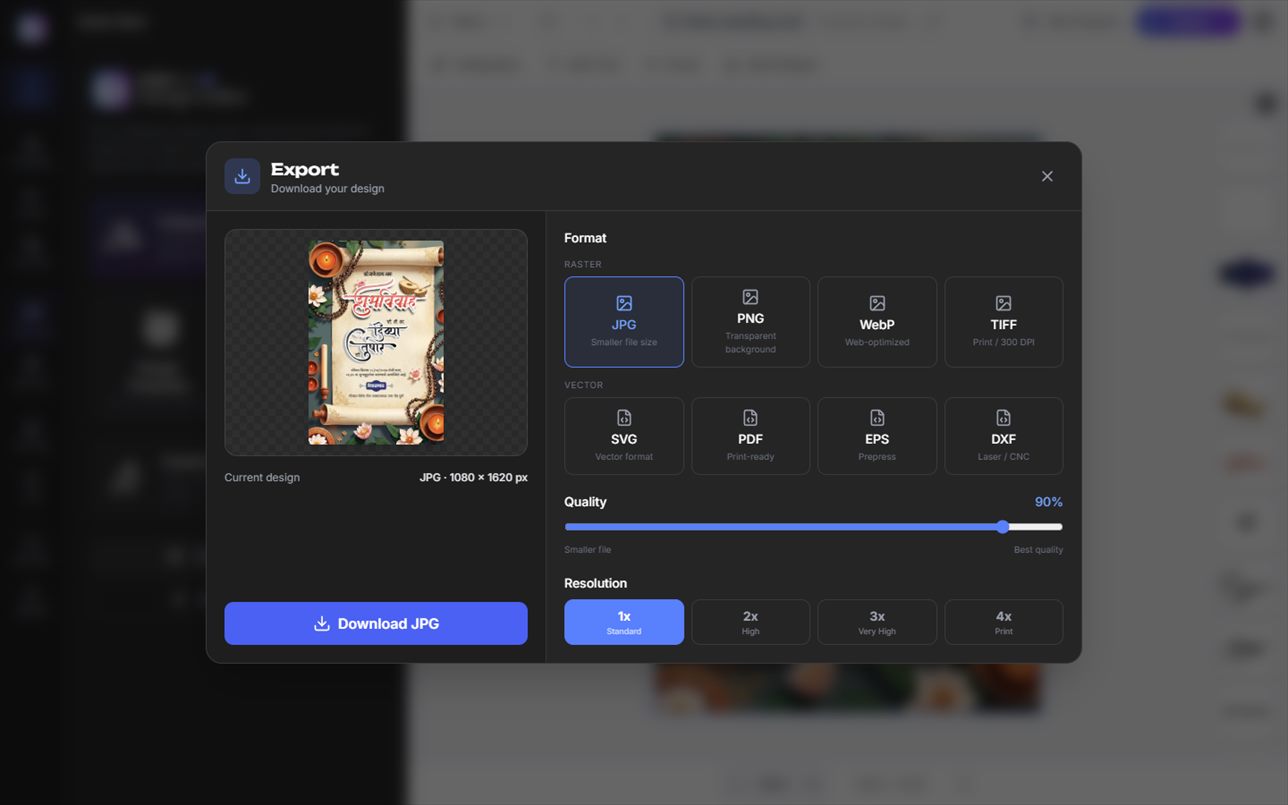
- Make the heading or the whole design in IndiaFont V6.
- Export it as SVG, EPS or PDF. These turn the text into paths, so CorelDRAW does not need the font.
- In CorelDRAW use File › Import and place it.
For laser and CNC work, export DXF.
Photoshop, Illustrator and InDesign
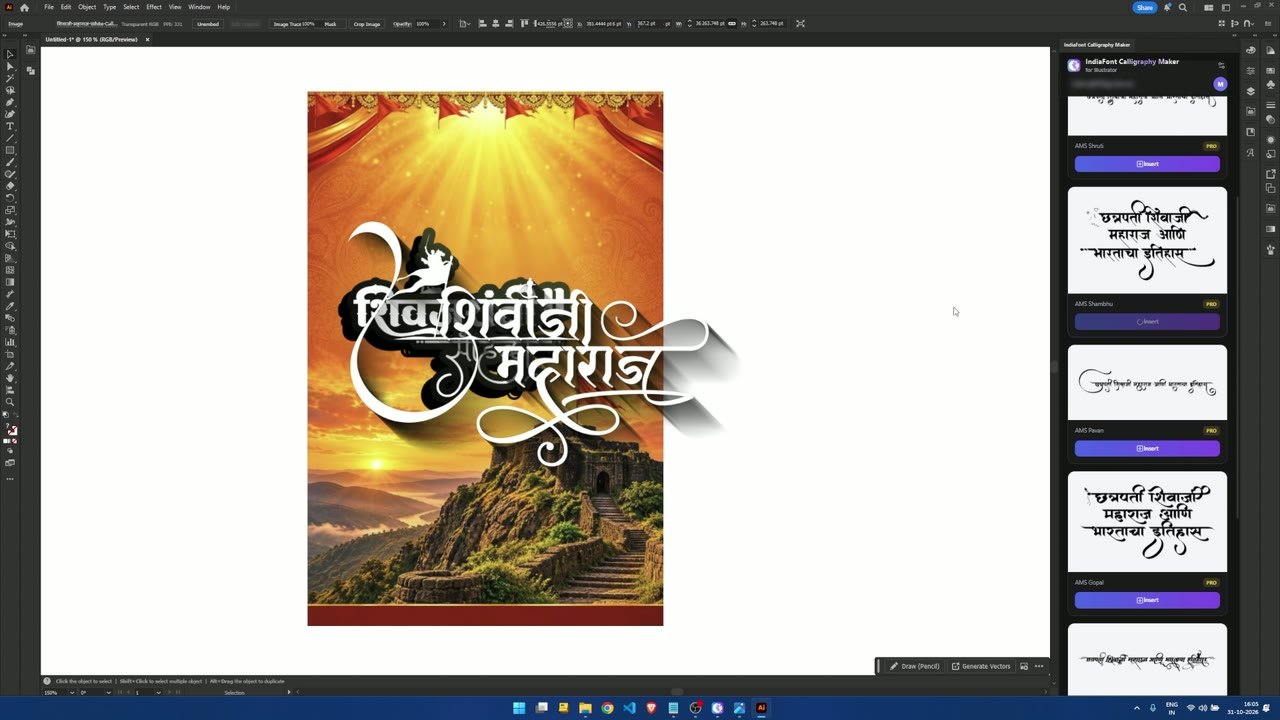
The same IndiaFont panel works in Adobe Illustrator, Photoshop, InDesign, Premiere Pro and After Effects (CC 2020 or newer), on Windows and Mac:
- Open a document, then choose Window › Extensions › IndiaFont Calligraphy Maker. In Photoshop it is under Window › Extensions (Legacy).
- In Illustrator and InDesign the text lands as vector shapes; in Photoshop as a shape layer or smart object; in Premiere Pro and After Effects as a picture.
- On a Mac with an Apple chip, Photoshop shows the panel only when it runs using Rosetta: right-click the Photoshop app › Get Info › tick Open using Rosetta.
See the Adobe plugin page for details.
FAQ
Frequently Asked Questions
Q:
Why does Hindi or Marathi text break in CorelDRAW?
AMS fonts are not Unicode fonts: their letters sit in their own positions. When Unicode text from WhatsApp, Word or Google gets an AMS font, CorelDRAW shows the wrong letters and matras. Convert the text to AMS first, or type it with the IndiaFont docker, which converts and draws the text for you.
Q:
How do I type Hindi in CorelDRAW?
Install IndiaFont V6, open My account › Plugins and click Install, then open Window › Dockers › IndiaFont Calligraphy Maker in CorelDRAW. Type in the Fonts tab (in Hindi or in English letters) and the text lands on your page as curves.
Q:
Which CorelDRAW versions does the IndiaFont docker work with?
CorelDRAW 2018 and newer, on Windows 10 or 11 (64-bit). CorelDRAW for Mac has no add-in system, so there is no Mac docker; IndiaFont V6 itself runs on Mac.
Q:
Do I need to install AMS fonts in Windows for the docker?
No. The fonts stay inside IndiaFont V6 and the docker places the text as curves. You need AMS fonts installed in Windows only if you paste converted text and apply the font yourself.
Q:
Is there a free way to convert Hindi text to AMS?
Yes, the free Unicode to AMS converter on IndiaFont.com. Paste the converted text in CorelDRAW and apply an installed AMS font. The docker saves you that step every time.
Q:
Can I use AMS fonts in Photoshop?
Yes. The IndiaFont panel works in Photoshop CC 2020 and newer (Window › Extensions (Legacy)). The text lands as a shape layer or smart object.
Related

Download IndiaFont V6 Free
IndiaFont + a full design tool in one app, and it also works inside CorelDRAW and Adobe. 342 AMS calligraphy fonts for Hindi, Marathi, Gujarati & English, Calligraphy AI, templates and text art.
- Free plan: ₹0, no card, no time limit
- 342 AMS fonts, Calligraphy AI, templates & text art
- Plugins for CorelDRAW, Illustrator, Photoshop & more
4 lakh+ downloads since 2017


